24×36 Print Size for EtsyExact pixel dimensions at 300 DPI — the largest standard poster size explained
7200×10800 pixels. 2:3 aspect ratio. Standard poster frame size. Here's everything you need to set up 24×36 digital downloads that sell — plus the full 2:3 ratio pack.
Free → export 24×36 via single export, or download the 2:3 pack with 7 sizes.

Quick Answer
What pixel dimensions for 24×36 at 300 DPI?
24×36 at 300 DPI — Exact Pixel Dimensions
The math is straightforward: multiply each dimension in inches by 300. 24 × 300 = 7200 pixels wide, 36 × 300 = 10800 pixels tall. This is the largest size in the 2:3 ratio family.
At this resolution, you have 77.7 million pixels total. Any modern DSLR or mirrorless camera captures this easily, and most digital artwork exports at these dimensions without issue.
The 2:3 aspect ratio matches DSLR camera sensors (width is 66.7% of height). This means photos from Canon, Nikon, Sony, and Fuji cameras scale to 24×36 without any cropping — the full frame is preserved.
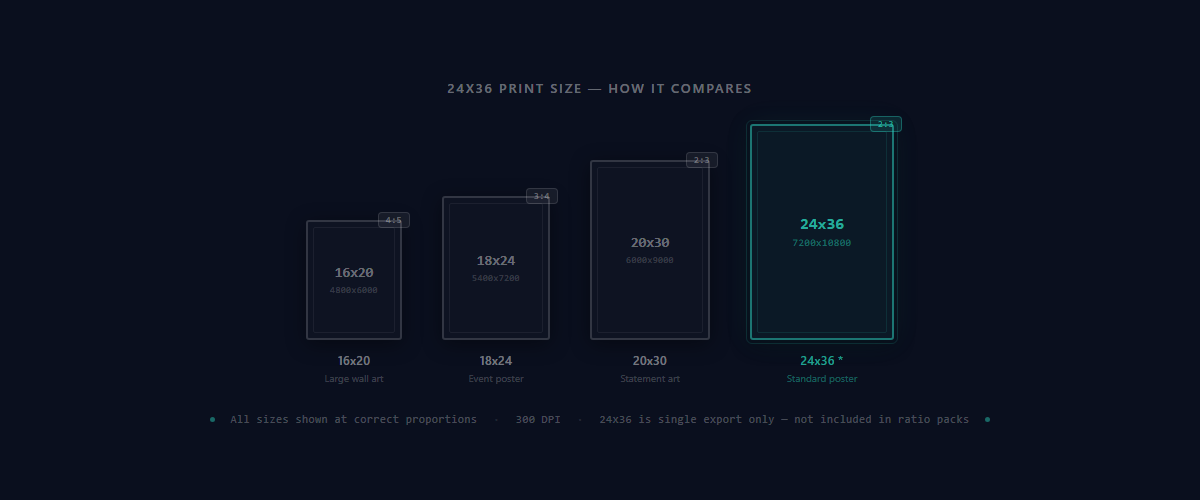
Why 24×36 Is Perfect for Etsy Wall Art
Standard Poster Size
24×36 is the standard poster frame size. Every major retailer stocks 24×36 frames: Target, Walmart, Amazon, IKEA, Michaels. Buyers don't pay a premium or wait for special orders — they can frame the print the same day.
Premium Pricing for Large Prints
Large-format prints command higher prices. A 24×36 digital download sells for $8-15, compared to $4-8 for smaller sizes. Including it in your 2:3 pack increases the perceived value of the entire bundle without additional work.
Same Ratio as Photos — No Cropping
2:3 is the native aspect ratio for DSLR and mirrorless cameras. If you're selling photography prints, 24×36 preserves the full composition captured by the camera. No cropping, no letterboxing, no black bars.
Upload Once, Get All 2:3 Sizes + 24×36 via Single Export
One upload gives you the 2:3 pack (4×6, 6×9, 8×12, 10×15, 12×18, 16×24, 20×30) at 300 DPI, plus 24×36 via single export — organized, named, and under 20 MB.
Generate All 2:3 SizesThe 2:3 Ratio Family — All Sizes Related to 24×36
24×36 belongs to the 2:3 aspect ratio family. All sizes in this group maintain identical proportions, so you scale up or down from the same source file without cropping — a crop only comes into play if you later reframe the design to a different ratio family, which is what Perfect Fit is for. The 2:3 pack includes seven sizes (4×6 through 20×30), and 24×36 is available via single export.
| Print Size | Pixels @ 300 DPI | Common Use |
|---|---|---|
| 4×6 | 1200 × 1800 | Photo prints, small frames |
| 6×9 | 1800 × 2700 | Photo matting, greeting cards |
| 8×12 | 2400 × 3600 | Common frame size |
| 10×15 | 3000 × 4500 | Mid-size wall art |
| 12×18 | 3600 × 5400 | Medium poster size |
| 16×24 | 4800 × 7200 | Large gallery wall |
| 20×30 | 6000 × 9000 | Oversized statement piece |
| 24×36Popular | 7200 × 10800 | Standard poster, available via single export |
When a competitor offers “24×36 only” and your listing includes all seven 2:3 pack sizes plus 24×36 via single export, yours appears to have much more value at the same price. Buyers perceive a complete size range instead of a single file.
For the full picture across all ratios (2:3, 3:4, 4:5, ISO, extras), see the complete Etsy print sizes guide. For ratio-specific guidance, see Etsy print ratios explained.
File Format & the 20MB Challenge
24×36 at 300 DPI creates large files. JPG (also called JPEG) is the right choice here — PNG at this size often exceeds Etsy's 20MB limit.
Use JPG / JPEG at 300 DPI
JPEG keeps file sizes well under Etsy's 20MB limit while maintaining full print quality. At 7200×10800 pixels, a JPEG with standard settings stays manageable for Etsy uploads and buyer downloads.
Avoid PNG for 24×36
PNG at this size often exceeds 20MB, especially for complex artwork or photography. Etsy will reject the upload. PNG has no visible quality benefit for prints — it's designed for web graphics with transparency, not large-format printing.
sRGB Color Profile
Embed sRGB in every file. Most home printers and online print services expect sRGB. Files in Adobe RGB or ProPhoto RGB shift colors during printing — reds turn orange, blues go purple. In Photoshop: Edit → Convert to Profile → sRGB IEC61966-2.1.
Professional File Naming
Use descriptive names like artwork_24x36_300dpi.jpg. Large files mean large downloads — buyers should find the right file instantly without guessing. Avoid generic names like “large.jpg” or “poster.jpg”.
Staying Under Etsy's 20 MB Limit
- Use JPEG, not PNG, for all 24×36 files
- Flatten all layers before export
- Embed sRGB color profile, not Adobe RGB
- Group by ratio pack — one ZIP per ratio stays under 20 MB
- Or use SnapToSize — auto-optimizes every file to stay under the limit
For detailed strategies, see Etsy 20 MB file limit guide. For resolution guidance, see best resolution for Etsy printables.
Framing & Display — What Buyers Need to Know
24×36 prints fit directly into standard 24×36 poster frames with no mat required. For a gallery look with a border, buyers can mat a 24×36 print inside a 30×40 frame. Including this information in your Etsy listing reduces buyer questions and increases perceived professionalism.
Frame & Mat Options
24×36 is large enough to anchor a gallery wall. Pair it with smaller sizes from the 2:3 pack (16×24, 8×12, 4×6) to create a cohesive multi-print layout. All sizes share the same 2:3 proportions, so they visually align. For a different ratio at a similar scale, see the 18×24 (3:4 ratio) guide, or the full 18×24 vs 24×36 comparison for exact pixels and when to offer each.
Listing tip: Add “Fits standard 24×36 poster frames (Target, IKEA, Amazon). For gallery presentation, mat in a 30×40 frame.” to your Etsy description. This single line increases buyer confidence and reduces support messages.
Common Mistakes With 24×36 Digital Prints
Using 72 DPI instead of 300 DPI
72 DPI is screen resolution. A 24×36 at 72 DPI is only 1728×2592 pixels — prints will be severely pixelated and blurry at poster size. Always export at 300 DPI. The file must be 7200×10800 pixels.
Offering only 24×36 without other 2:3 sizes
Buyers expect multiple sizes in digital print downloads. Listings with only 24×36 convert poorly compared to competitors who include the full 2:3 family. Include all seven pack sizes plus 24×36 via single export.
Using PNG format
PNG files at 24×36 and 300 DPI often exceed Etsy's 20MB limit. Etsy will reject the upload, or buyers won't be able to download the file. Use JPEG for all large-format print files.
Wrong color profile (Adobe RGB or ProPhoto RGB)
Files in Adobe RGB or ProPhoto RGB display incorrect colors when printed on most home printers and print services — reds appear orange, blues shift purple. Convert to sRGB before exporting. Every time.
What Resolution Do You Need for a 24×36 Print?
For professional print quality, a 24×36 print requires 7200 × 10800 pixels at 300 DPI. This is the standard used by both home printers and professional print shops.
| DPI | Pixel Dimensions | Use Case |
|---|---|---|
| 72 DPI | 1728 × 2592 px | Screen only |
| 150 DPI | 3600 × 5400 px | Acceptable at distance |
| 300 DPIStandard | 7200 × 10800 px | Professional standard |
| 600 DPI | 14400 × 21600 px | Overkill for most printers |
Related 2:3 Sizes at 300 DPI
What if your file isn't large enough?
Upscaling a small file to 7200 × 10800 pixels loses quality — the software invents pixels that weren't there. SnapToSize optimizes your output automatically but requires a good source file to begin with. For guidance on source file requirements, see the how to resize images for Etsy guide.
Get All 2:3 Sizes in One Click
Upload your artwork and instantly receive the 2:3 pack (4×6, 6×9, 8×12, 10×15, 12×18, 16×24, 20×30) plus 24×36 via single export at 300 DPI. Named, 300 DPI, and ready to publish — plus the room photos to list them with.
Start Free — Generate Sizes NowFrequently Asked Questions
Exactly 7200×10800 pixels. Multiply each dimension by 300: 24×300 = 7200 pixels wide, 36×300 = 10800 pixels tall. As a JPEG with sRGB color profile, the file stays well under Etsy's 20MB limit.
2:3 (or 0.667 as a decimal). This is the same ratio as DSLR cameras and includes 4×6, 6×9, 8×12, 10×15, 12×18, 16×24, 20×30, and 24×36. All these sizes can be scaled from the same source file with your whole composition intact.
Yes — 24×36 is the standard poster frame size, available at every major retailer (Target, Walmart, Amazon, IKEA, Michaels). Buyers can also mat a 24×36 print in a 30×40 frame for a gallery-style presentation.
JPEG at 300 DPI keeps file sizes well under Etsy's 20MB limit. PNG at this size often exceeds 20MB and should be avoided. Use JPEG with sRGB color profile for all large-format print files.
The 2:3 pack includes 7 sizes: 4×6, 6×9, 8×12, 10×15, 12×18, 16×24, and 20×30. Export 24×36 separately via single export. Buyers expect multiple sizes in digital downloads, and bundling increases perceived value at the same price point.
7200 × 10800 pixels at 300 DPI is the professional standard for a 24×36 print. This applies to both home printers and professional print shops.
Technically yes, but you'll see a noticeable quality drop, especially at normal viewing distances. 150 DPI produces a 3600 × 5400 px file — acceptable for large-format banners viewed from far away, but not for detailed art prints.
Uncompressed, a 24×36 at 300 DPI is around 220 MB. As an optimized JPEG (Etsy-ready), expect 15–25 MB — well within Etsy's 20 MB per-file limit.
Still exporting 24×36 files manually for every listing?
Upload once, get 24×36 plus 29 other sizes at 300 DPI. Organized in ratio packs, ready for Etsy.
Get All SizesNo account needed · No credit card required